Pages

Showing posts with label windows 7. Show all posts

Wednesday, September 22, 2010

More than two million downloads for the beta of IE 9


Launched last Thursdaythe public beta forInternet Explorer 9 has obviously already been downloaded over 2 million times just two days after its release, to believe the site windowsteamblog.com. A nice figure, especially when compared to that recorded by the beta ofIE 8, launched in August 2008 and downloaded 1.3 million five days after its release.

Download IE9

Sunday, August 15, 2010

Another smartphone Windows 7 Phone from Samsung!


A bit like the model from Asus that came out of nowhere last weekend, here's a new smartphone from Samsung with Windows 7 Phone ! Obviously no specifications for the moment, but eventually a design quite similar to Asus.

Sunday, August 8, 2010

New Asus Windows 7 Phone ?


It has not been found in California, but in Pakistan! This prototype of an Asus smartphone on Windows 7 Phone has no name, nor even of features, but we can already bet on a OLED screen at least, an aluminum design and even a camera in front...

Sunday, June 20, 2010

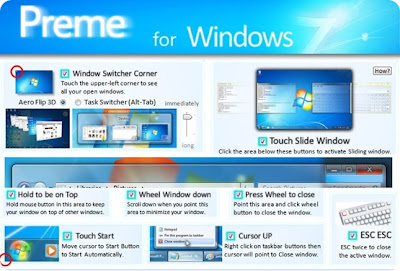
If you work with many windows in Windows, they need Preme


There are few times that we find an application like Preme: a program that appears from nowhere and suddenly, dramatically improves Windows. Specifically, how to manipulate the multiple windows that are likely to keep open during our meeting.

Wednesday, May 19, 2010

New LG Mobile Phone Windows 7 leak?


In any case, this assertion site Handcellphone.com , who thinks he got his hands on a phone of LG based on Windows 7 Phone and not yet officially announced by the firm. Whatever the motive in question appears with an AMOLED 3.8 ", a 5 megapixel sensor, a Calvier QWERTY showing a thickness less than that of Nexus One.

Tuesday, April 27, 2010

Offline Windows Update (XP, Vista, 7) with AutoPatcher

This application recommended by Klez in the Forum , allows you to download and update Windows in its many versions (recently added support for Windows 7 (32-bit and 64 bit)). Best of all, of course, is that this autopatcher download all updates to a folder so that you need them for a second installation of Windows, we have on hand in seconds!


Usage Examples
Say you have multiple computers at home or in the office. I really want to download in each, Windows patches? With Autopatcher, we can download them all at once, save the installer and files over a network shared folder, and let all machines used to update the OS!
You may have to upgrade another machine, but have a slow internet connection or do not have one by now? Simply run Autopatcher on another PC (which can carry a USB), download the files in the Office or the PC of a friend, bring the USB home again, and begin to update the system!


Install / Download
The program will decompress in a folder, and this will generate folders with the "modules" or patches for the version of Windows that we have separated the critical updates and the optional, for example.


The first time you run the application, we will have to update the necessary components to add support for x64 Windows 7. Moreover, this first update will download absolutely all Windows patches, including those who have already installed, and to create a sort of back up after updates can be stored on a DVD, or another folder.
Only then, will appear Autopatcher.exe, the application itself. Now a question of simply copying this folder to a USB, or leave it somewhere on our PC, and increasingly the emergence of new updates, simply run "apup.exe" will update not only the autopatcher, but also downloaded the latest updates . (That also tell us which updates have already installed).


Download Autopatcher

Thursday, April 8, 2010

Windows 7 SP 1 (Service Pack 1) Beta on the interwebs!


Yes, SP1 Has Been Leaked on P2P networks Various, But we must take Into account to download this version of Service Pack 1 is not a good idea after-all, this is a Beta version.

Saturday, March 27, 2010

Use Virtual XP Mode

Windows 7 comes with built-in support to virtually run Windows XP. This is a great feature for those who are still holding on to XP or have applications that are not compatible with Windows 7 and Vista.

Requirements for XP mode
  • Check for compatibility with SecurAble.
  • 1 GHz 32-bit / 64-bit processor required.
  • Memory (RAM) – 1.25 GB required, 2 GB memory recommended.
  • Recommended 15 GB hard disk space per virtual Windows environment.
NB: Windows XP Mode is only available in Windows 7 Enterprise, Windows 7 Professional, and Windows 7 Ultimate.

Sunday, March 21, 2010

Running Windows XP applications in Windows 7. XP Mode now more compatible.

Mode XP is just a virtual machine with XP, and will allow, of course, XP applications run smoothly, and we are running on XP. Thanks to advances in virtualization, most processors (core 2 for below) will have no problem driving the other OS 9 years of age simultaneously.

Until recently, running in XP mode was somewhat problematic as Virtual Windows XP, which is based on Virtual PC, required a hardware very specific. However, a latest update released by Microsoft was that these conditions disappear, allowing anyone with a copy of Windows 7 (Professional, Enterprise, or Ultimate), Windows XP emulated run and, therefore, ensure compatibility with all applications running on XP.

Friday, March 19, 2010

A concept of Windows 7 Series Phone Tablet


First, the Courier, and then the concept of touch pad embarking Phone Windows 7 Series. Finally, with regard to this concept, he draws his entire essence in his party games, due to the implantation of 2 joysticks on its casing.

Wednesday, March 17, 2010

Windows 7 32 or 64 bit


Should I use the 32 or 64 bit version of Windows 7?

All the Windows users asking question, when they going to install Windows7

This article address the above question and helps you to get the answer that best suit you needs.
First of all I'm introducing the requirements for operating Windows 7

Xbox Live 3 D Game on Windows 7 Phone

Microsoft took advantage of the MIX 10 to give us an overview of a game for Windows 7 SeriesPhone. In fact, Joe Belfiore who gave us a demo of TheHarvest, a sort of Diablo-like 3D quickly realized during GDC 2010, consistent with the success with your Gamerscore and including level gameplay destructible scenery . Still ...

Thursday, March 11, 2010

Minimize or Close Windows Live Messenger to system tray on Windows 7


When I boot up my Windows 7 PC Windows Live Messenger also start up, It's good help me to keep in touch with my friends; but sometimes I have to work offline and need to open a lot of windows and minimize those applications in the taskbar.Windows Live Messenger auto starts up and minimizes into taskbar with two taskbar buttons, and I found a solution for this.

Sunday, March 7, 2010

Need to Update applications to work on Windows 7 mobile

A very interesting article has appeared over at tech.yahoo.com in relation to something which has been confirmed by a Microsoft executive and it’s not good.

Although at first thought just as a suspicion, sadly it has now been confirmed by a top executive for Microsoft’s mobile division that thousands of existing Windows Mobile apps are not going to be compatible with the up coming very much talked about Windows Phone 7 OS.

It was during an event on Thursday that Charlie Kindel executive of Microsoft said that Windows Phone 7 marks a pretty distinct break with past versions of Windows Mobile. Another rumour was also confirmed during the event which was that Windows Mobile 6.5 isn’t going anywhere.

That isn’t all bad though as it does seem quite possible that the existing apps could be modified in order to work on WP7, although this process isn’t thought to be an easy one.

Thursday, February 18, 2010

Microsoft offers a fresh approach to phone software

First look at Windows 7 Mobile


Forget any previous version of Windows Mobile. Forget the fact that Windows Mobile exists, the new mobile OS from Microsoft is called Windows Phone 7 Series, and you want to make any previous memory is just that, a memory. Officially presented in Barcelona, its new operating system is a radical change that simply destroys the previous versions, starting from scratch both programming and visual.


Following rumors of recent days, Windows Phone 7 Series features a redesigned interface that offers integration with Xbox Live and Zune, the last device that has inspired graphics to the menus, icons consist of large textual moving gently to make access social functions, multimedia and gaming, integrated with Xbox Live, avatars and profiles. Just like Mac owners have incentive to buy an iPod / iPhone for its integration, now, an Xbox 360 experience can enjoy a "unified" by acquiring a WP7S phone (and vice versa, it is also important).

Learn more >>


Wednesday, February 10, 2010

Creating shortcuts for shutdown in Windows 7

The most often asked for Microsoft Windows tweaks is for shortcuts that shutdown, power down, and restart a Windows session.If you dislike the new Windows Vista shutdown menu, you are probably in the majority. An alternative option is to create icons that will let you shut down, lock, or restart your computer without having to mess with that stupid popup menu.if you want a shortcut elsewhere or to assign a hotkey, this should help you out.
The procedure for Windows 7 is very similar to that of Vista and XP, but now you can pin those freshly created shortcuts to the Start Menu or the Taskbar or to both.


techthesaurus on Facebook